The Loyalty Program allows store owners to award points for eligible paid orders and let customers redeem available points as store credit during checkout.
How to set it up?
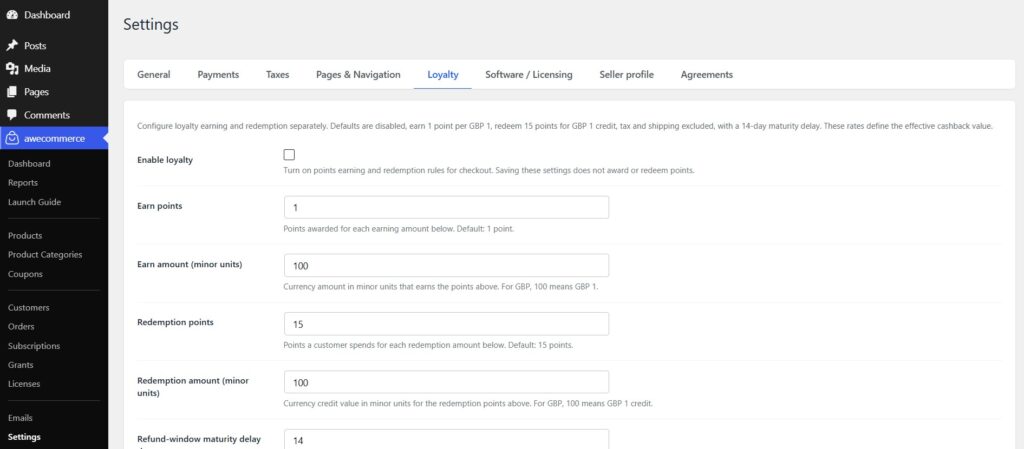
- Open
AweCommerce -> Settingsand find the Loyalty Program settings. - Confirm Loyalty is disabled by default before setup.
- Enable Loyalty only after earn and redemption rules are configured.
- Configure earn rate, redemption rate, maturity/refund-window delay, tax/shipping inclusion, minimum redemption, max cart percentage, and product/category restrictions as needed.
- Save settings and verify Store Health before announcing loyalty to customers.
Recommended setup practices:
- Keep earn and redemption rates in integer minor-unit terms.
- Use a refund-window maturity delay so points are pending until refund risk is lower.
- Be explicit about whether tax and shipping count toward eligible spend.
- Use product/category restrictions when only selected catalog items should earn points.
- Keep redemption caps conservative if refunds or negative balances are operationally sensitive.
Admin operations:
- Store Health should show loyalty enabled state, maturity job health, stuck reservations, negative balances, and large manual adjustments.
- Customer admin panels should show balance summary, lifetime earned/redeemed, manual adjustment form, adjustment reason/note, and ledger history.
- Order admin panels should show earned, redeemed, reversed points, calculation metadata, and refund reversal controls.
- Reports should include issued points, redeemed points, available liability, pending liability, negative balances, reversals, and manual adjustments.
Refund and reversal behavior:
- Refunds and chargebacks should reverse points proportionally and idempotently.
- Refund UI should default to reversing loyalty where appropriate, and skipping reversal should be explicit and audited.
- If points were already spent before a refund, the customer can move into a negative balance rather than silently losing audit history.